> ## Documentation Index
> Fetch the complete documentation index at: https://docs.gateway.connexease.com/llms.txt
> Use this file to discover all available pages before exploring further.
# Profile
> Manage your WhatsApp Business public profile shown to message recipients.
## Overview
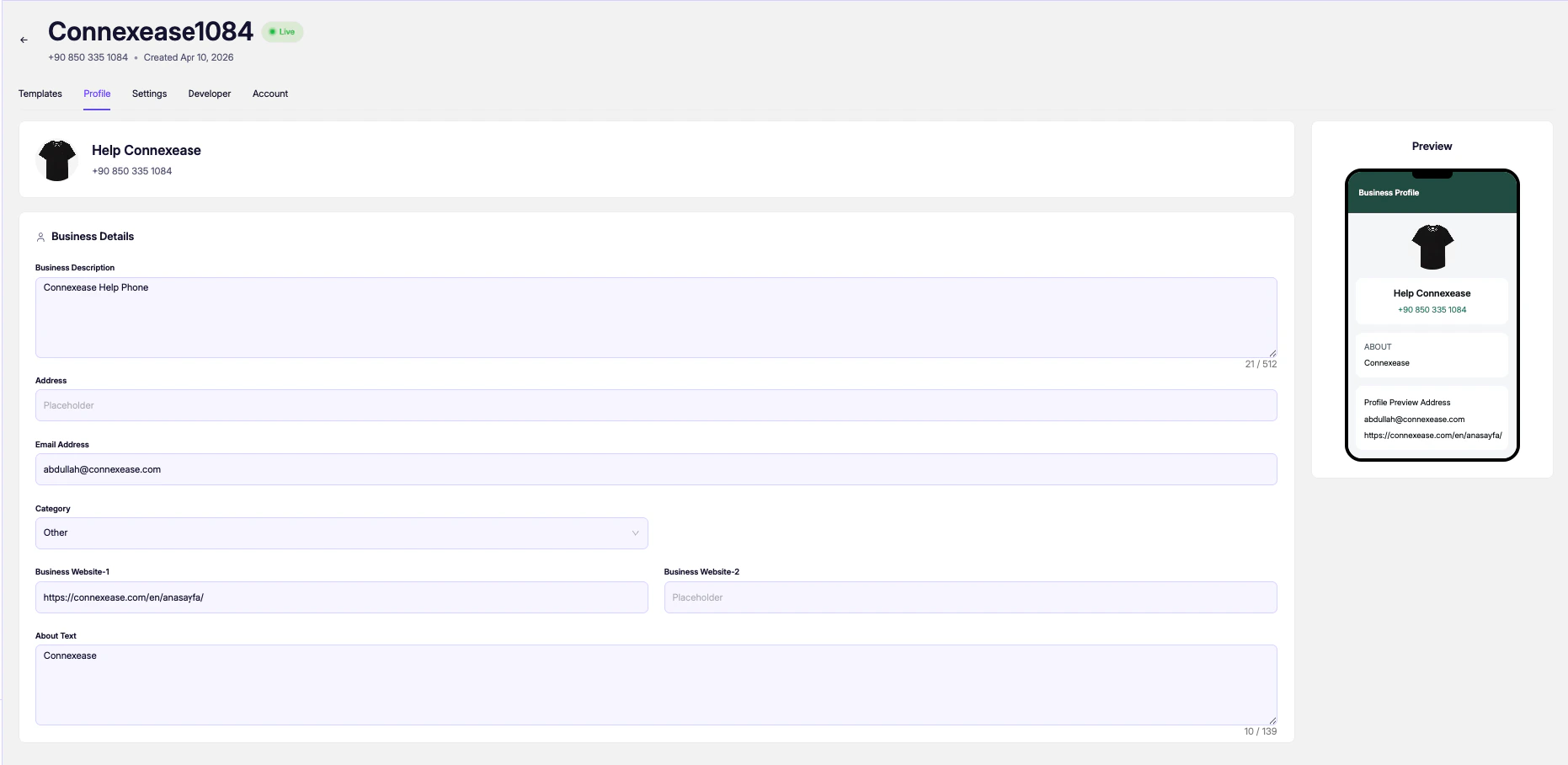
The **Profile** tab lets you edit the public-facing business profile of your WhatsApp number — the information users see when they open your contact or receive a message from you. A live **Preview** panel on the right reflects your changes in real time.
Access it from the app's top navigation: **Profile**.
 ***
## Profile Header
The top of the page shows the current profile picture (your business logo), display name, and phone number. These are pulled from your Meta Business account.
***
## Business Details
| Field | Description |
| ------------------------ | ---------------------------------------------------------------------------------------------------------- |
| **Business Description** | A short public description of your business, visible on your WhatsApp profile. Max 512 characters. |
| **Address** | Your business's physical address. Optional. |
| **Email Address** | A contact email shown on your profile (e.g. `info@yourbusiness.com`). |
| **Category** | The industry category for your business (e.g. `Other`, `E-Commerce`, `Finance`). Selected from a dropdown. |
| **Business Website-1** | Primary website URL (e.g. `https://connexease.com`). |
| **Business Website-2** | Secondary website URL. Optional. |
| **About Text** | Short "about" text shown under your profile picture in WhatsApp. Max 139 characters. |
***
## Live Preview
The **Preview** panel on the right side shows how your profile will appear to users in WhatsApp, including:
* Profile photo
* Display name and phone number
* **About** text
* Contact email and website links
Keep your **Business Description** concise and professional. Users see this when they tap your contact in WhatsApp — a clear description builds trust and improves response rates.
Changes to your profile are submitted to Meta and may take a few minutes to reflect on recipients' devices. Profile photo changes must be made directly in Meta Business Manager.
***
## Profile Header
The top of the page shows the current profile picture (your business logo), display name, and phone number. These are pulled from your Meta Business account.
***
## Business Details
| Field | Description |
| ------------------------ | ---------------------------------------------------------------------------------------------------------- |
| **Business Description** | A short public description of your business, visible on your WhatsApp profile. Max 512 characters. |
| **Address** | Your business's physical address. Optional. |
| **Email Address** | A contact email shown on your profile (e.g. `info@yourbusiness.com`). |
| **Category** | The industry category for your business (e.g. `Other`, `E-Commerce`, `Finance`). Selected from a dropdown. |
| **Business Website-1** | Primary website URL (e.g. `https://connexease.com`). |
| **Business Website-2** | Secondary website URL. Optional. |
| **About Text** | Short "about" text shown under your profile picture in WhatsApp. Max 139 characters. |
***
## Live Preview
The **Preview** panel on the right side shows how your profile will appear to users in WhatsApp, including:
* Profile photo
* Display name and phone number
* **About** text
* Contact email and website links
Keep your **Business Description** concise and professional. Users see this when they tap your contact in WhatsApp — a clear description builds trust and improves response rates.
Changes to your profile are submitted to Meta and may take a few minutes to reflect on recipients' devices. Profile photo changes must be made directly in Meta Business Manager.