> ## Documentation Index
> Fetch the complete documentation index at: https://docs.gateway.connexease.com/llms.txt
> Use this file to discover all available pages before exploring further.
# Dashboard Overview
> Understanding the main Gateway dashboard and navigation.
## Overview
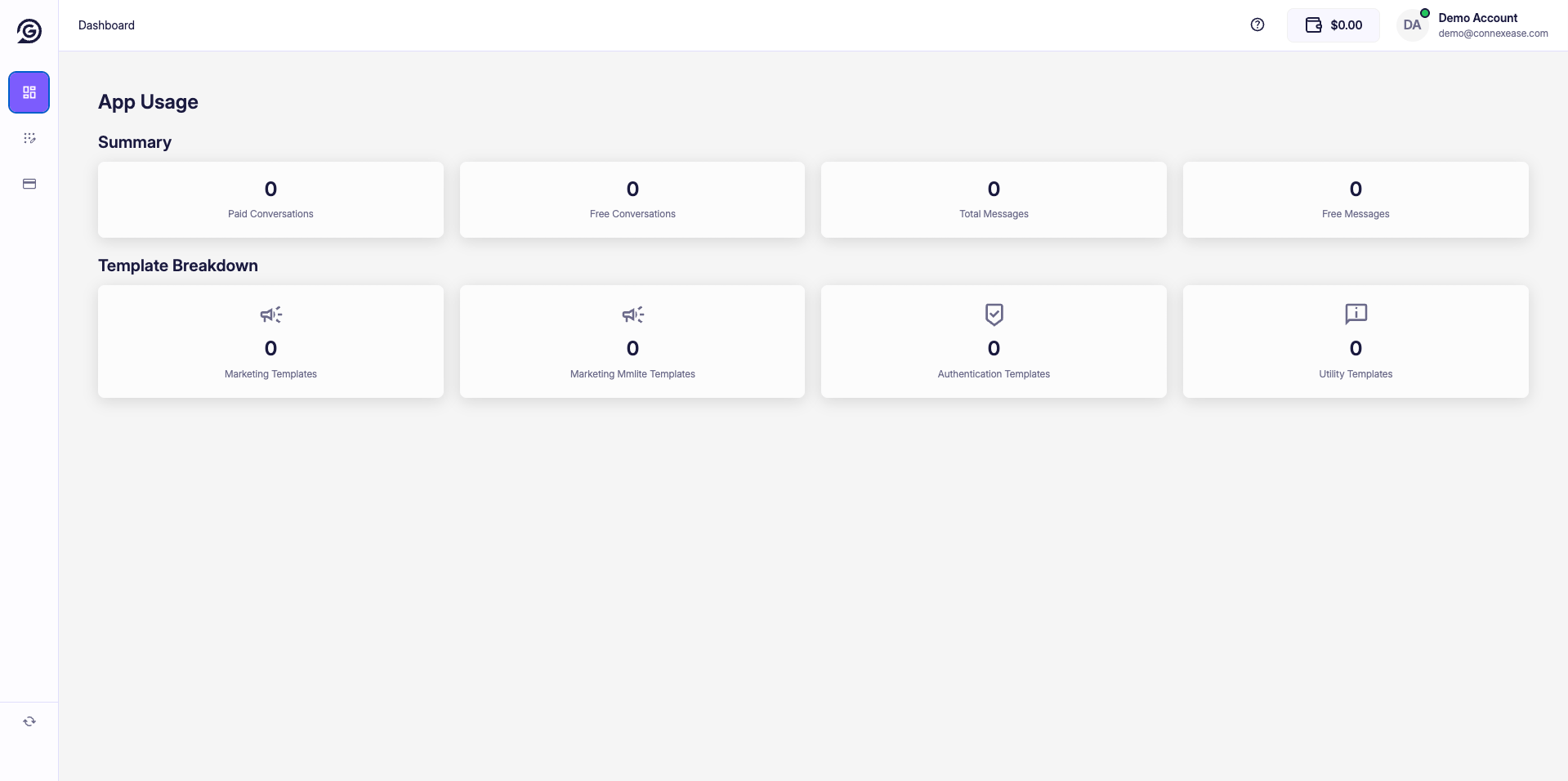
After completing your account setup, you are redirected to the **Dashboard** — the central hub for monitoring your WhatsApp API usage, templates, and billing.
 ***
## Navigation
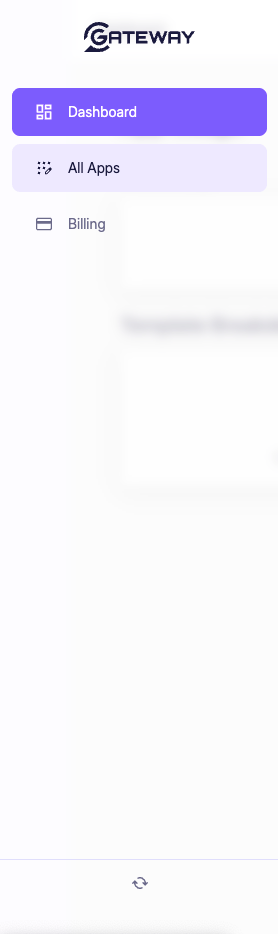
The left sidebar provides access to all major sections of the Gateway platform.
***
## Navigation
The left sidebar provides access to all major sections of the Gateway platform.
 | Item | Description |
| ------------- | ------------------------------------------------------------------------------------------ |
| **Dashboard** | Main overview page with usage stats and template breakdown. |
| **All Apps** | Manage your Gateway apps. Each app corresponds to a WhatsApp Business account integration. |
| **Billing** | View your balance, transaction history, and manage payment methods. |
The icon at the bottom left is the **Changelog / Updates** button, which shows recent platform updates.
***
## Top Bar
| Element | Description |
| ----------------------- | ---------------------------------------------------------------------------------- |
| **Page Title** | Displays the name of the current section (e.g. `Dashboard`). |
| **Help icon (?)** | Opens the support or help center. |
| **Balance (\$0.00)** | Shows your current Gateway credit balance. |
| **Account avatar (DA)** | Displays your account name and email. Click to access account settings or log out. |
***
## App Usage — Summary
The **Summary** section shows aggregate messaging metrics across all your apps for the selected period.
| Metric | Description |
| ---------------------- | ----------------------------------------------- |
| **Paid Conversations** | Number of conversations billed to your account. |
| **Free Conversations** | Conversations within Meta's free tier. |
| **Total Messages** | Total messages sent and received. |
| **Free Messages** | Messages that didn't incur a charge. |
***
## Template Breakdown
The **Template Breakdown** section shows how many messages were sent using each template category.
| Category | Description |
| ------------------------------ | ---------------------------------------------------------- |
| **Marketing Templates** | Promotional messages sent to opted-in users. |
| **Marketing Mmlite Templates** | Lightweight marketing template variant. |
| **Authentication Templates** | OTP and verification messages. |
| **Utility Templates** | Transactional messages such as order updates and receipts. |
All metrics default to **0** on a freshly created account. They will populate as you start sending messages through your apps.
| Item | Description |
| ------------- | ------------------------------------------------------------------------------------------ |
| **Dashboard** | Main overview page with usage stats and template breakdown. |
| **All Apps** | Manage your Gateway apps. Each app corresponds to a WhatsApp Business account integration. |
| **Billing** | View your balance, transaction history, and manage payment methods. |
The icon at the bottom left is the **Changelog / Updates** button, which shows recent platform updates.
***
## Top Bar
| Element | Description |
| ----------------------- | ---------------------------------------------------------------------------------- |
| **Page Title** | Displays the name of the current section (e.g. `Dashboard`). |
| **Help icon (?)** | Opens the support or help center. |
| **Balance (\$0.00)** | Shows your current Gateway credit balance. |
| **Account avatar (DA)** | Displays your account name and email. Click to access account settings or log out. |
***
## App Usage — Summary
The **Summary** section shows aggregate messaging metrics across all your apps for the selected period.
| Metric | Description |
| ---------------------- | ----------------------------------------------- |
| **Paid Conversations** | Number of conversations billed to your account. |
| **Free Conversations** | Conversations within Meta's free tier. |
| **Total Messages** | Total messages sent and received. |
| **Free Messages** | Messages that didn't incur a charge. |
***
## Template Breakdown
The **Template Breakdown** section shows how many messages were sent using each template category.
| Category | Description |
| ------------------------------ | ---------------------------------------------------------- |
| **Marketing Templates** | Promotional messages sent to opted-in users. |
| **Marketing Mmlite Templates** | Lightweight marketing template variant. |
| **Authentication Templates** | OTP and verification messages. |
| **Utility Templates** | Transactional messages such as order updates and receipts. |
All metrics default to **0** on a freshly created account. They will populate as you start sending messages through your apps.